

Description
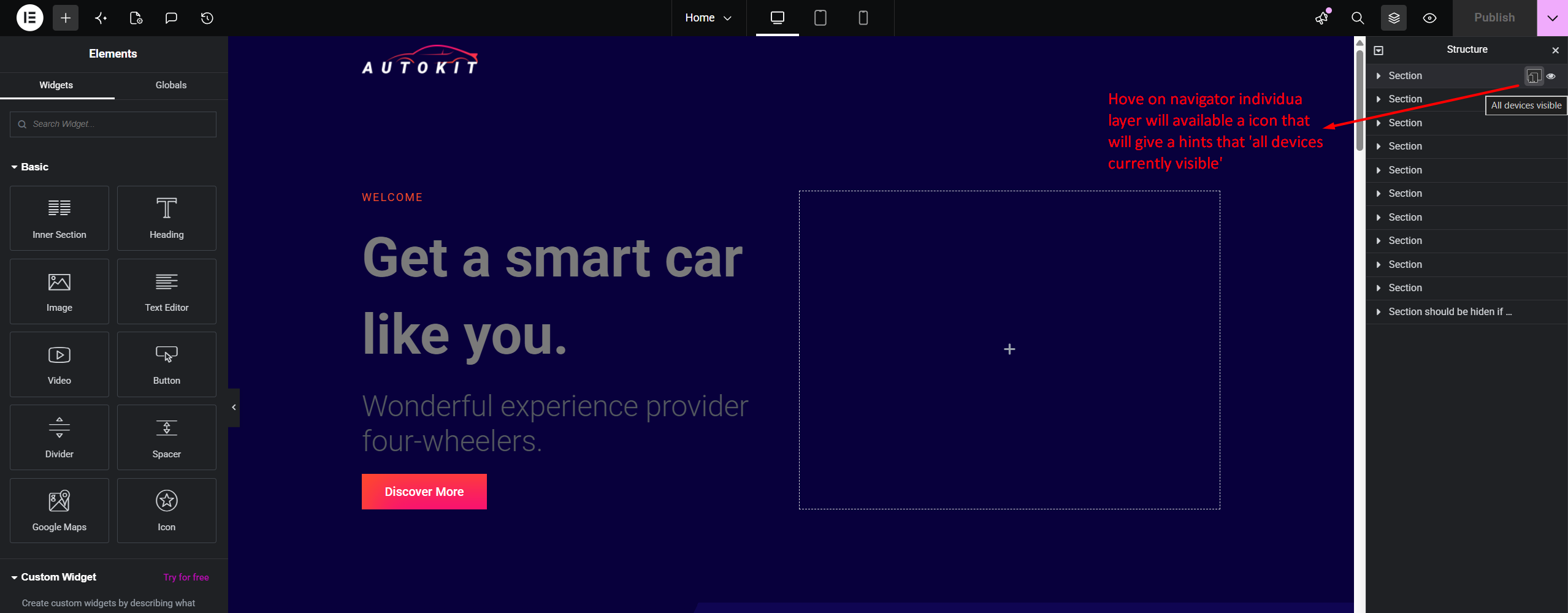
RespSync Visibility Toggle adds a fast, intuitive device visibility toggle button directly inside the Elementor Structure (Navigator) panel item rows.
With a single click, users can check and toggle element visibility across Desktop, Tablet, and Mobile devices without navigating through multiple tab controls in the Elementor settings panel.
Key Features
- Navigator Panel Integration: Instant access directly on Navigator tree items.
- Dynamic Multi-Device Status: Visual device icon indicator showing active and hidden states.
- Floating Tooltip Popup Controls: Compact floating popup with dedicated toggle controls for Mobile, Tablet, Desktop, and All devices.
- Linear Gradient Title Masking: Elegant linear-gradient fade effect on long layer titles when tooltip popup is active.
- Native Synchronization: Seamlessly updates Elementor settings model and marks document as modified for saving.
- Lightweight & Fast: Pure JavaScript integration with zero overhead on front-end performance.
Screenshots


Installation
- Upload the
respsync-visibility-toggle-for-elementordirectory to the/wp-content/plugins/directory. - Activate the plugin through the ‘Plugins’ menu in WordPress.
- Open any page in the Elementor Editor and view the Structure (Navigator) panel.
FAQ-e
-
Does this plugin affect site loading speed?
-
No. The plugin only loads within the Elementor Editor environment and adds zero JavaScript or CSS assets to your public front-end site.
-
Does it require Elementor Pro?
-
No, it works seamlessly with both Elementor Free and Elementor Pro.
Reviews

Contributors & Developers
“RespSync Visibility Toggle for Elementor” is open source software. The following people have contributed to this plugin.
Contributors
Translate “RespSync Visibility Toggle for Elementor” into your language.
Interested in development?
Browse the code, check out the SVN repository, or subscribe to the development log by RSS.
Changelog
1.1.0
- Feature: Replaced slide-down panel with a sleek floating tooltip popup positioned next to the RespSync icon.
- Feature: Added dedicated device toggle controls (Mobile, Tablet, Desktop, All devices) inside the floating tooltip.
- Feature: Added smooth linear-gradient text masking on the Navigator item title so long layer titles appear to pass beneath the floating tooltip.
- Improvement: 4th button (“All Devices”) maintains a static clean icon and triggers red background strictly when all 3 individual devices are hidden.
- Fix: Prevented Elementor layer item selection when clicking device icons inside the tooltip popup.
1.0.0
- Initial public release.