

Description
Want to close more deals without paying a CRM fee for every user? FlyCRM is the easiest way to run your CRM on WordPress.
FlyCRM is a powerful free CRM plugin for WordPress. Track leads, manage deals and send quotes from one CRM kanban sales pipeline, inside the WordPress admin you already use, without paying a fee for every user.
FlyCRM is built and maintained by weDevs, a WordPress focused software company with 13 years in the ecosystem, trusted by over 1 million users across its product portfolio.
FlyCRM is under active development, with regular releases, security improvements and ongoing compatibility updates for the latest versions of WordPress and WooCommerce.
See FlyCRM, the WordPress CRM with no per-user fees, in action.
👉 Learn More About FlyCRM (PRO): All the CRM features
👉 Plans and Pricing: FlyCRM pricing
👉 Confused about how to get started? Read the FlyCRM blog
👉 Docs & Support: Access Now
👉 What is new: Changelog and Roadmap
How FlyCRM works
A lead arrives from a form on your site, or you add it yourself. You give it a score, track it through your lead statuses, and when it is ready you turn it into a contact, a company and a deal in one step. The deal moves across the stages of your sales pipeline on the CRM kanban board. You send a quote as a PDF, your client opens it on a link without logging in and accepts or declines it, and every note, call and meeting stays attached to the record so the history is there next time. WooCommerce orders come into the CRM as contacts on their own, with their order history on the record.
Why people choose FlyCRM
Customer relationship management usually means a monthly CRM subscription and somebody else’s servers. FlyCRM keeps your CRM in your own WordPress database instead.
-
Your customer data stays with you. Contacts, deal values and client correspondence sit in your own WordPress database. Nothing is sent anywhere else and there is no account to sign up for.
-
No monthly bill and no record cap. Keep a hundred contacts or a hundred thousand. The number does not change what you pay, because the free plugin has no record cap and no subscription.
-
A sales pipeline you can see. Deals sit on a CRM kanban board you drag them across, with a total for each stage, so you know what is in play without building a report first.
-
Quotes your client can sign off from a link. A quote goes out as a PDF on its own web page. Your client reads it, accepts or declines, and you see when they opened it.
-
The history is on the record. Notes, calls, emails, meetings, tasks and files all land on one timeline, so the next person to pick up the account can read what happened.
What FlyCRM is for
-
A WordPress CRM with a sales pipeline, run inside your admin instead of in a separate tool
-
A self-hosted CRM that keeps customer records in your own database
-
A small business CRM for a team that shares one pipeline without per-seat fees
-
A sales CRM with deal management for a sales team working from one WordPress site, where each salesperson can be kept to their own records
-
A B2B CRM where contacts belong to companies and one deal can carry several decision makers
-
A freelancer CRM for keeping track of clients, quotes and follow-ups
-
An agency CRM for client records, client deals and quotes that have to stay in a particular country
-
A WooCommerce CRM that turns store customers into CRM contacts
Lead management, lead tracking and lead scoring
Leads are kept apart from contacts, so an enquiry that goes nowhere never clutters your customer list. FlyCRM gives each lead a score, a source and a status, so you can see which enquiries are worth chasing.
-
Lead scoring, a number on every lead that you set yourself and sort your list by
-
Lead tracking by source, with the campaign, medium, source, content and term a lead arrived on, plus the page that referred it
-
Lead statuses ready to use from the start, covering New, Contacted, Working, Nurture, Qualified, Unqualified and Converted
-
Lead capture from Contact Form 7, WPForms, Fluent Forms, Ninja Forms and Gravity Forms, with a lead source set per form
-
One-step conversion of a lead into a contact, a company and a deal, with the lead history kept
Contact management and client management
-
Contact profiles with name, email, several phone numbers, job title, social links and addresses
-
Company profiles with industry, employee count, revenue, website, logo and the contacts who work there
-
Custom statuses with colour coding, and separate sets for contacts, companies and leads
-
Tags across every record type, for filtering and segmenting
-
An activity timeline on every record, holding notes, calls, emails, meetings, tasks and files
-
Owner assignment, so every client has somebody responsible for them
-
Last-contacted tracking, showing when a record was last engaged and how
-
CSV import for contacts and companies, with field mapping and duplicate detection on email
-
CSV export for leads, contacts and companies, matching the search, filters and order on screen, with status, tags and owner, ready to open in Excel
-
Trash and restore, so a deletion is recoverable
Sales pipeline and deal management
Deal management in FlyCRM happens on the CRM kanban board. Every deal carries its value, expected close date and the people involved, and moves stage by stage until it is won or lost.
-
Build as many sales pipelines as you need, each with its own stages
-
Reorder your open stages by dragging them, and give each one a win probability. Won and Lost stay at the end where they belong
-
The pipeline you start with has Qualified, Proposal, Negotiation, Won and Lost
-
A CRM kanban board for the deal pipeline, with drag and drop between stages and a total for each stage
-
Deal value, expected close date and win probability on every deal
-
Several contacts on one deal, each with their own role, for the deals with more than one decision maker
-
Stage changes are recorded, so you can see how a deal moved and when
Quotes clients can accept online
-
Quotes with line items, discounts and tax
-
Quote numbers issued automatically, with a prefix you choose
-
A PDF for every quote, attached when you email it
-
A public link for each quote, so a client reads it without a WordPress account
-
Clients accept or decline from that page and the status follows
-
Tracking for when a quote was opened and what happened to it
-
Quote PDFs in more languages: when a quote has Bengali, Chinese, Japanese, Korean or other text the built-in PDF font cannot show, FlyCRM warns you and downloads a matching font in one click
Integrations
FlyCRM is a WordPress CRM, so it connects to the plugins many WordPress sites already run. Switch each one on under FlyCRM, then Integrations.
-
Contact Form 7, WPForms, Fluent Forms, Ninja Forms and Gravity Forms. Each form is set up on its own, so you choose which forms feed the CRM. Any form field maps to a CRM field, a single full name field is split into first and last name for you, and every submission becomes a lead with the source you picked for that form.
-
WooCommerce, as a WooCommerce CRM. Orders create contacts, with the order statuses that trigger it under your control. Total order value, order count, average order value and last order show on the contact, each order is logged to the timeline, and a one-time import brings in customers who ordered before you installed FlyCRM.
-
Dokan. An approved Dokan vendor becomes a contact and their store becomes a linked company. Live, First Sale and Closed tags follow each vendor over time, orders can be logged on the vendor’s timeline, and existing vendors are imported in the background.
-
weMail. Contacts are pushed to a weMail list as they change, and existing contacts can be synced in bulk.
-
With FlyCRM Pro: HubSpot (one-way or two-way contact sync), Help Scout, AWeber, Mailchimp, MailPoet and Google Workspace, for Google Meet links and calendar invites on your meetings.
The CRM dashboard
-
The admin menu, settings, list pages and dashboard fit a phone screen
-
Cards for new contacts, new companies, activity volume and tasks, each measured against the period before
-
Sales pipeline value broken down by stage
-
Win rate, average deal size, and open, won and lost deal totals
-
An attention panel for overdue tasks, overdue deals and deals that have gone quiet
-
A list of the tasks and meetings coming up
-
Your highest value contacts and companies
-
A date range you choose, with the comparison period following your selection
CRM roles and permissions
-
Two roles. CRM Manager reaches everything, and CRM Agent reaches their own records only
-
Give somebody a CRM role from the WordPress Users screen the same way you would any other role
-
Administrators get full CRM access as soon as the plugin is switched on
-
Access is set for each record type and each action, so an agent can be allowed to add a deal without being allowed to delete one
-
An agent can be given everyone else’s records as well, one record type at a time, for the teams that work that way
Email from the CRM
-
Send a quote from the CRM with the PDF attached
-
Your own mail server settings and a test button, inside FlyCRM
-
Every sent email logged against the contact, company, lead or deal it belongs to
Everything in this list is in the free plugin
-
Contacts and companies with full profiles, addresses, tags and custom statuses
-
Owner assignment, last-contacted tracking, and trash with restore
-
Leads with scoring, source tracking and one-step conversion
-
As many sales pipelines as you need, with custom stages and win probabilities
-
The kanban deal pipeline board, with drag and drop and a total per stage
-
Deals with value, expected close date and several stakeholder contacts
-
Quotes with line items, discounts, tax, a PDF and a public accept or decline page
-
The activity timeline for notes, tasks, calls, emails, meetings and files
-
CSV import for contacts and companies, and CSV export for leads, contacts and companies
-
Lead capture from five form plugins
-
WooCommerce order sync, with a one-time import of earlier customers
-
Dokan and weMail integrations
-
The dashboard, with period comparison and pipeline value by stage
-
Both CRM roles, with access set per record type and per action
-
Email sending through your own mail server
-
No cap on how many records you create
What FlyCRM Pro adds
These features are part of FlyCRM Pro, a paid upgrade from weDevs at https://flycrm.co/pricing/.
-
Invoices, with payment tracking, partial payments and a payment history
-
Turning an accepted quote into an invoice in one step
-
Taking payment online through Stripe and PayPal
-
Workflow automation, so a record being created or changed can trigger a sequence with conditions, branches and waits
-
Custom fields on leads, contacts, companies and deals
-
A product catalogue inside the CRM, for line items you reuse
-
Sales reports, covering the pipeline funnel, sales velocity and how long deals sit in each stage
-
Email templates, with a library of placeholders for contact, deal, sender and business details
-
Inbox sync, so a client’s reply comes back onto the record
-
Inviting colleagues into the CRM by email, instead of assigning the CRM roles from the WordPress Users screen
-
CSV import for leads, alongside the contact and company import in the free plugin
-
Automatic lead scoring from 0 to 100, with a Hot Leads dashboard widget and workflows that react when a score changes
-
HubSpot, Help Scout, AWeber, Mailchimp, MailPoet and Google Workspace integrations
-
A CRM Admin role that runs the whole CRM, settings and team included, without WordPress admin rights
A CRM for small businesses, agencies, freelancers and WooCommerce stores
FlyCRM is built for four kinds of user. Freelancers and consultants who need to know which enquiries are worth chasing and want quotes a client can sign off from a link. Small businesses and sales teams who want a sales CRM with a pipeline board, without a per-seat subscription. Agencies that need an agency CRM for client records they keep for somebody else, often in a particular country. WooCommerce shops that want a WooCommerce CRM, with their customers in a CRM rather than only in an order list.
Privacy Policy
FlyCRM uses the Appsero SDK to collect some telemetry data, only after you allow it. This helps us fix problems faster and improve the CRM.
The Appsero SDK does not gather any data by default. It starts gathering basic telemetry data only when you allow it in the setup wizard or the admin notice. It sends usage counts, such as how many contacts or deals you have, never the CRM records themselves.
Source Code
The human readable source, and the build steps that produce the compiled files, are on GitHub.
https://github.com/weDevsOfficial/flycrm
Screenshots
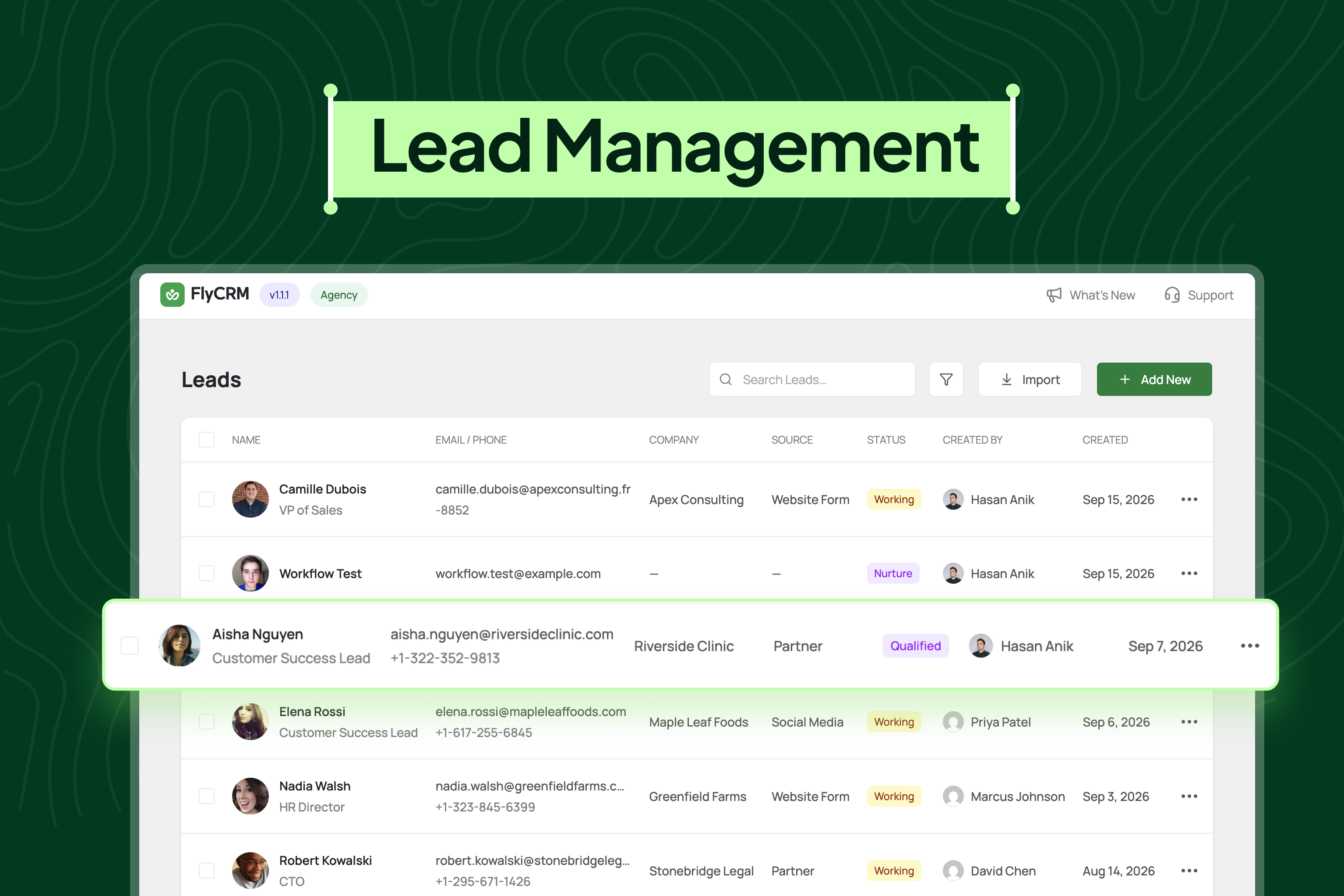
Lead management: the lead list showing company, source, status and owner for every lead, with search, filters and one-click add
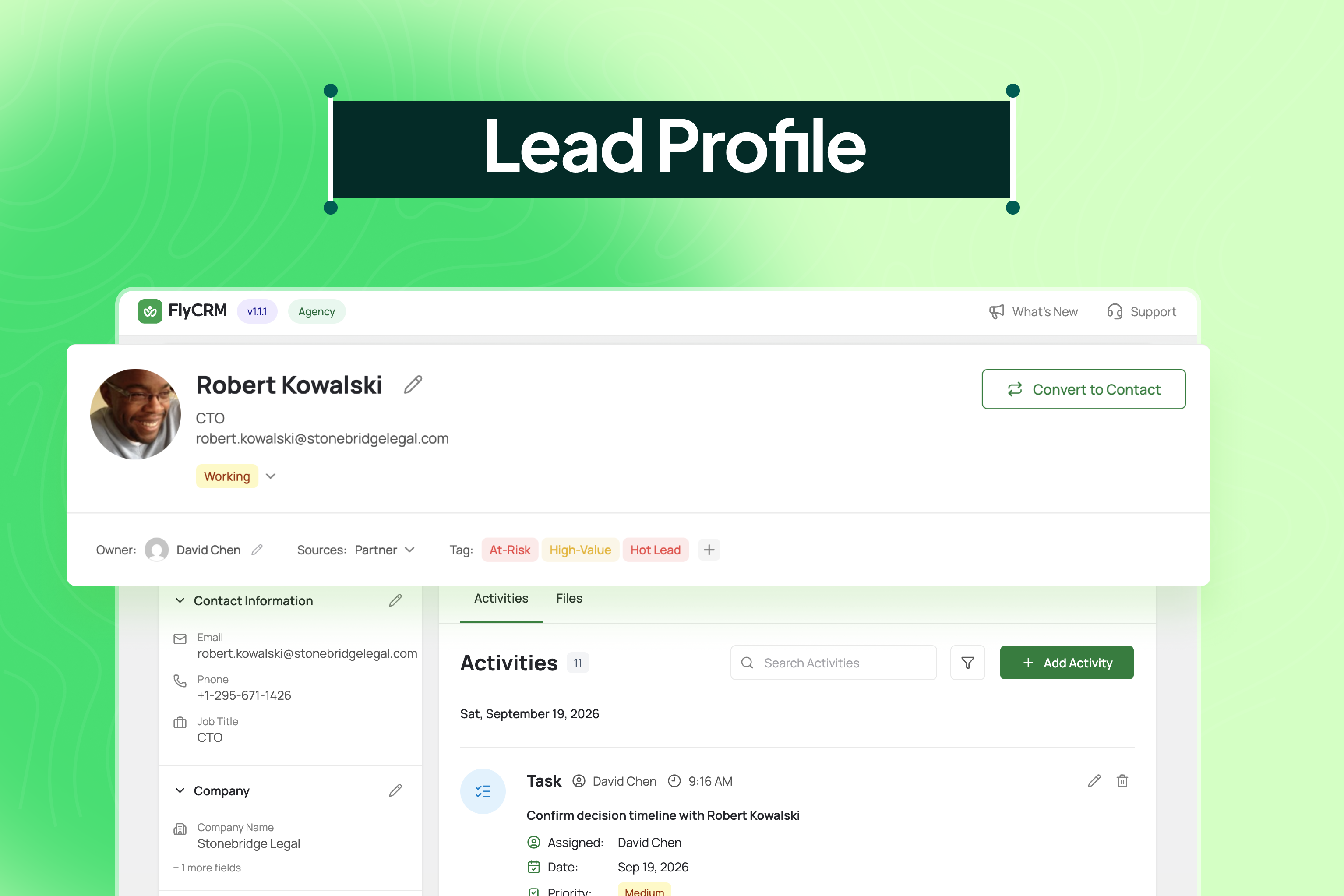
A single lead with status, owner, tags and contact details, its full activity timeline and the one-step conversion to a contact
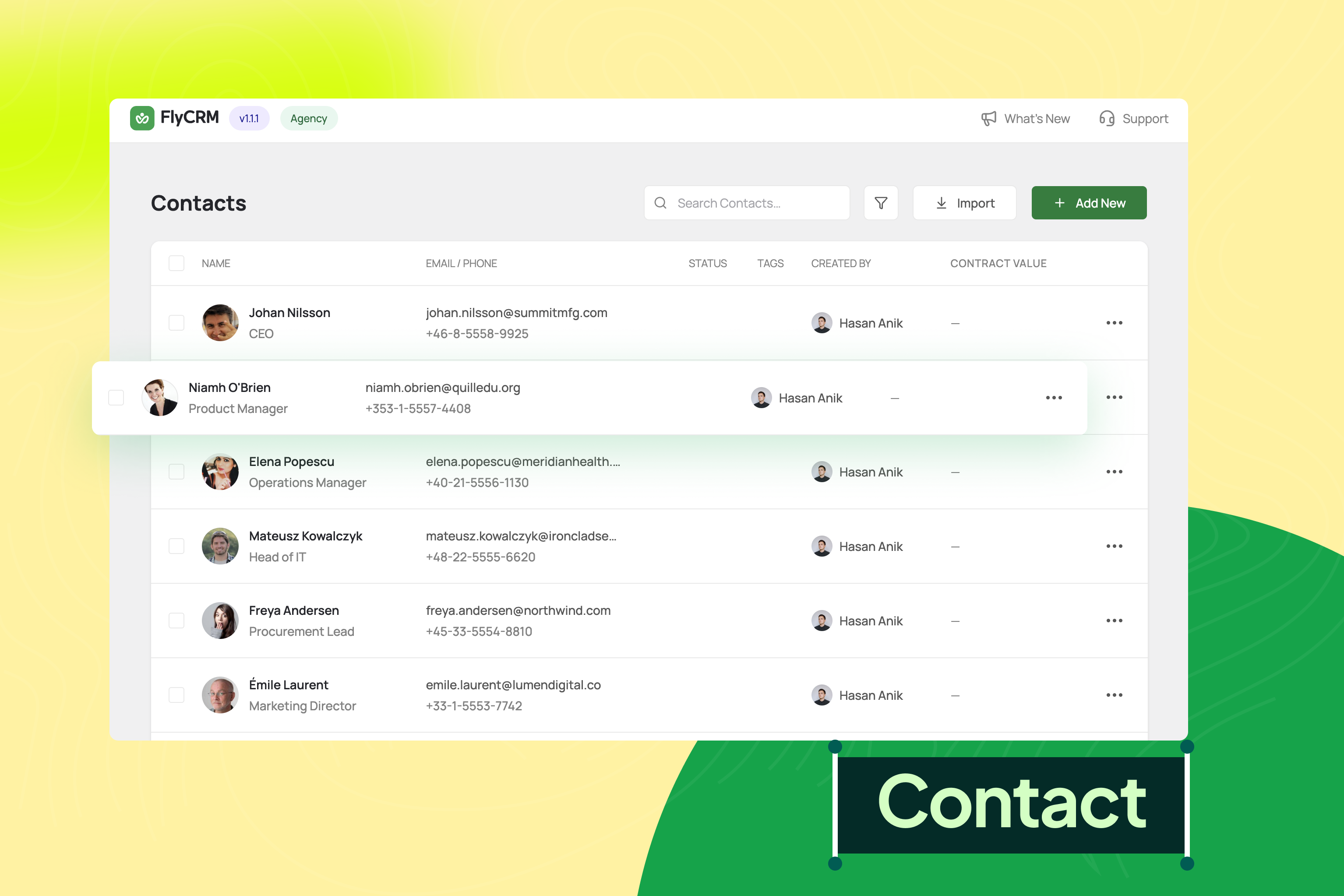
Contact management: the contact list with status, tags, owner and contract value, searchable and ready for bulk import
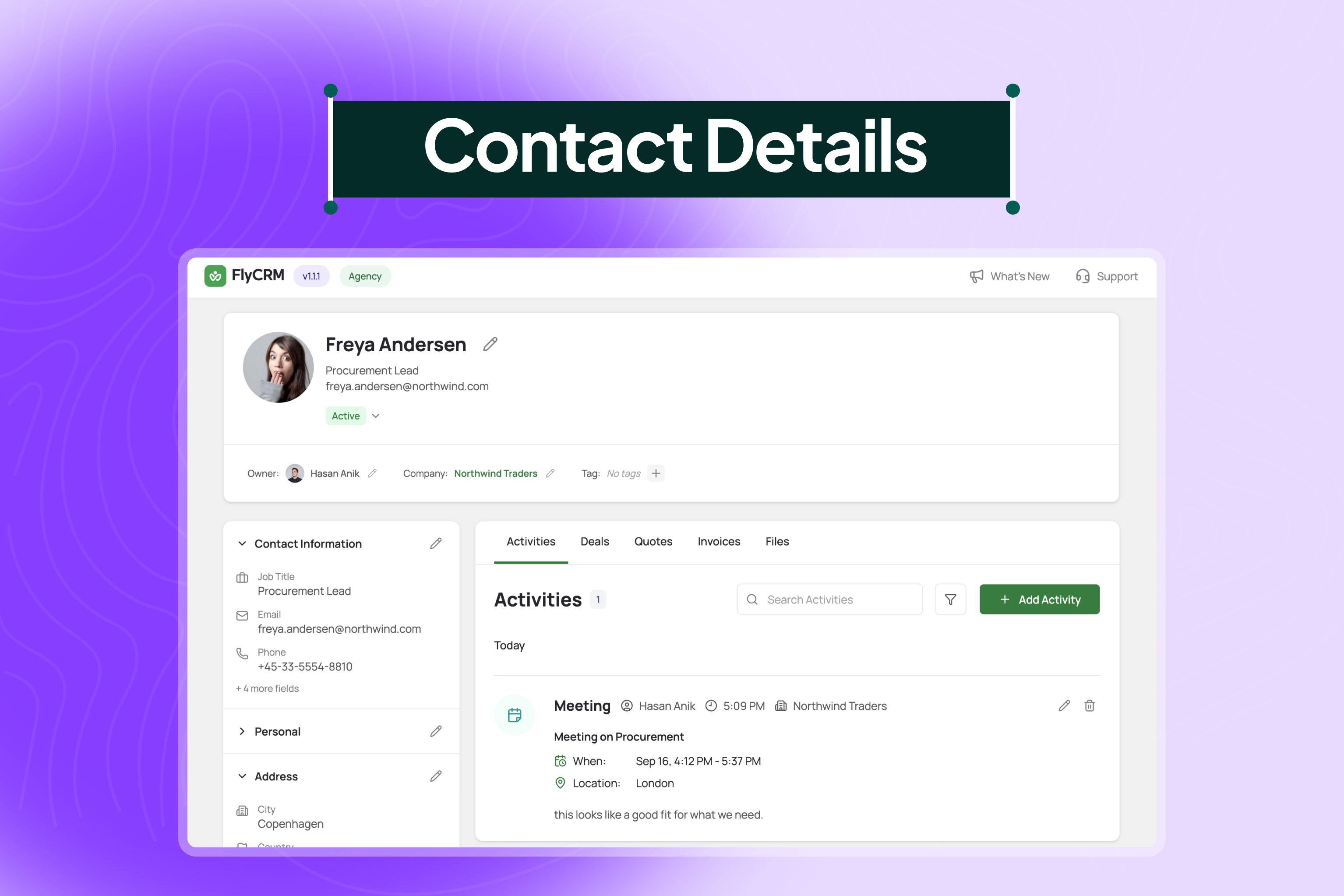
A single contact with company, owner and address details, plus activities, deals, quotes and files in one place (the Invoices tab comes with FlyCRM Pro)
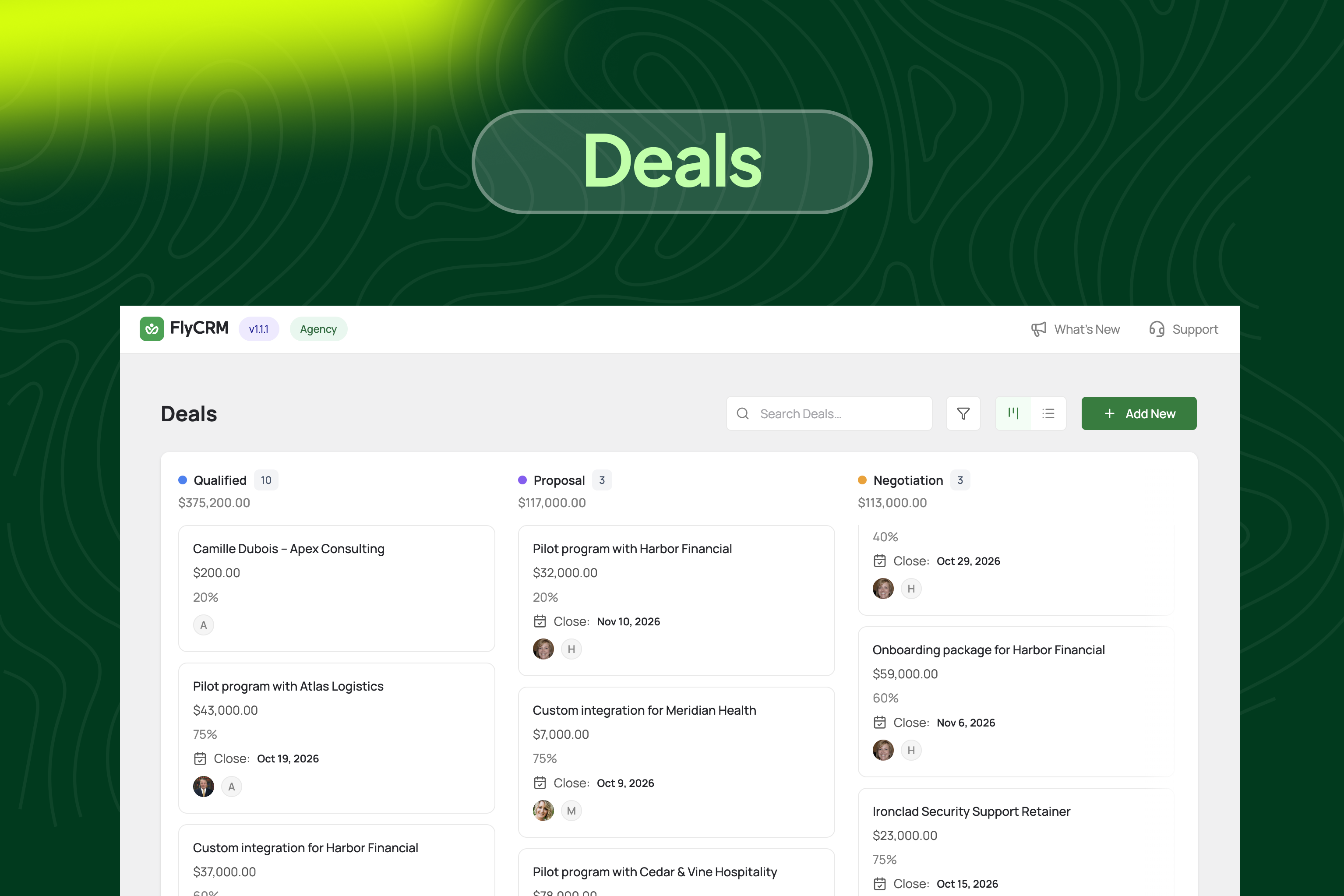
The deal pipeline as a kanban board, with a count and total value per stage and probability and close date on every card
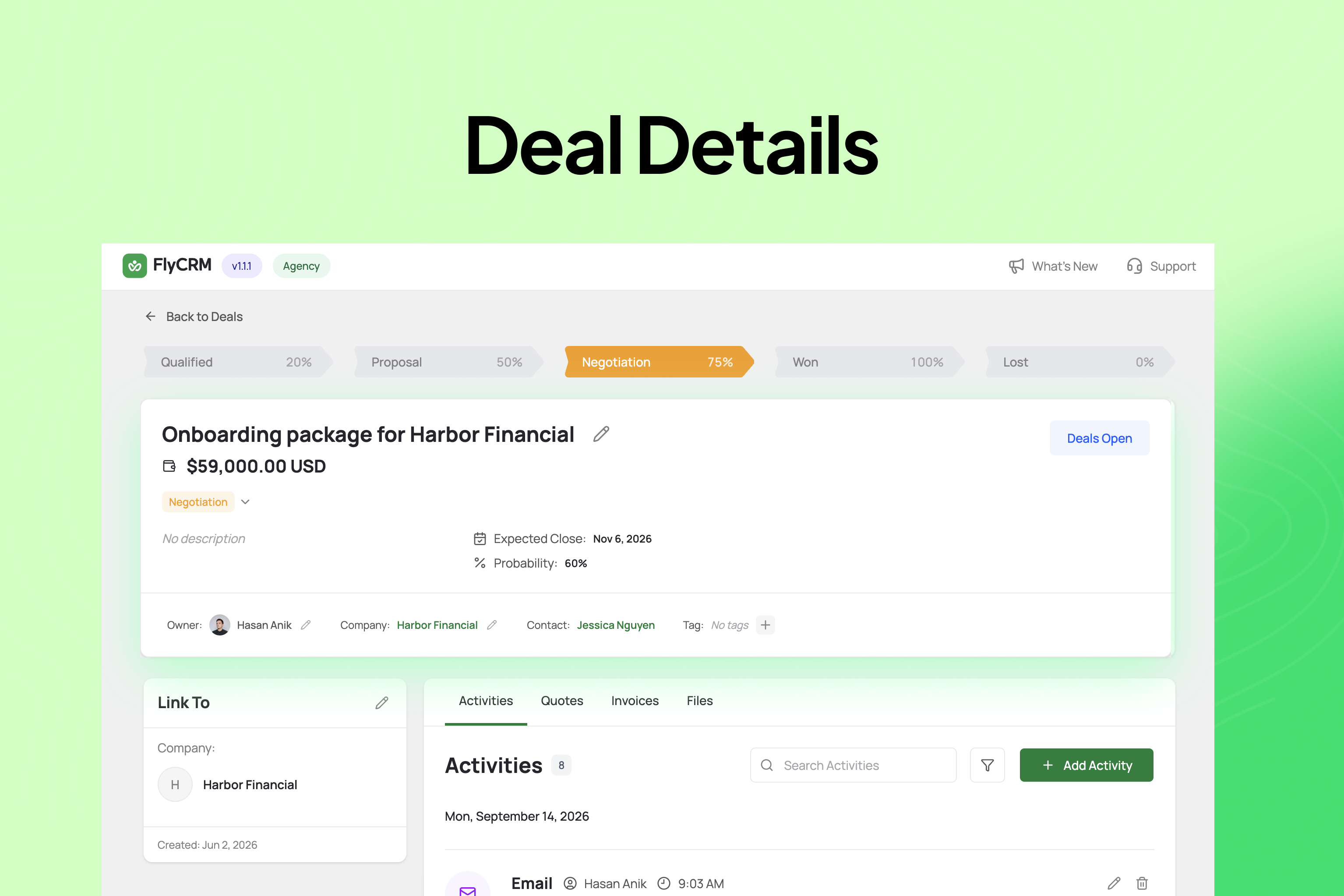
A single deal showing stage progression, value, probability and expected close date, with its activities and quotes linked to it (linked invoices come with FlyCRM Pro)
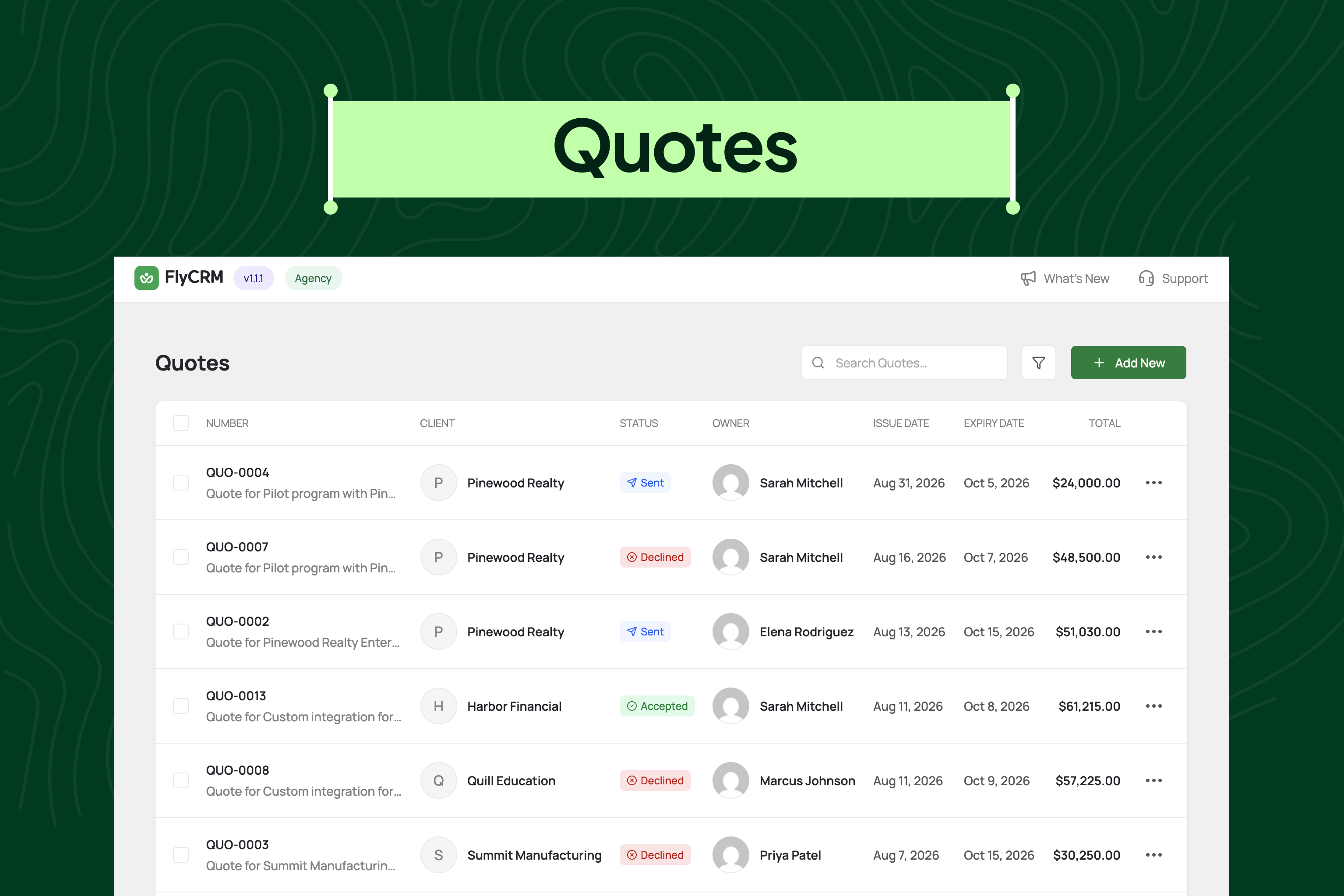
Quotes with client, owner, sent, accepted or declined status, issue and expiry dates and totals
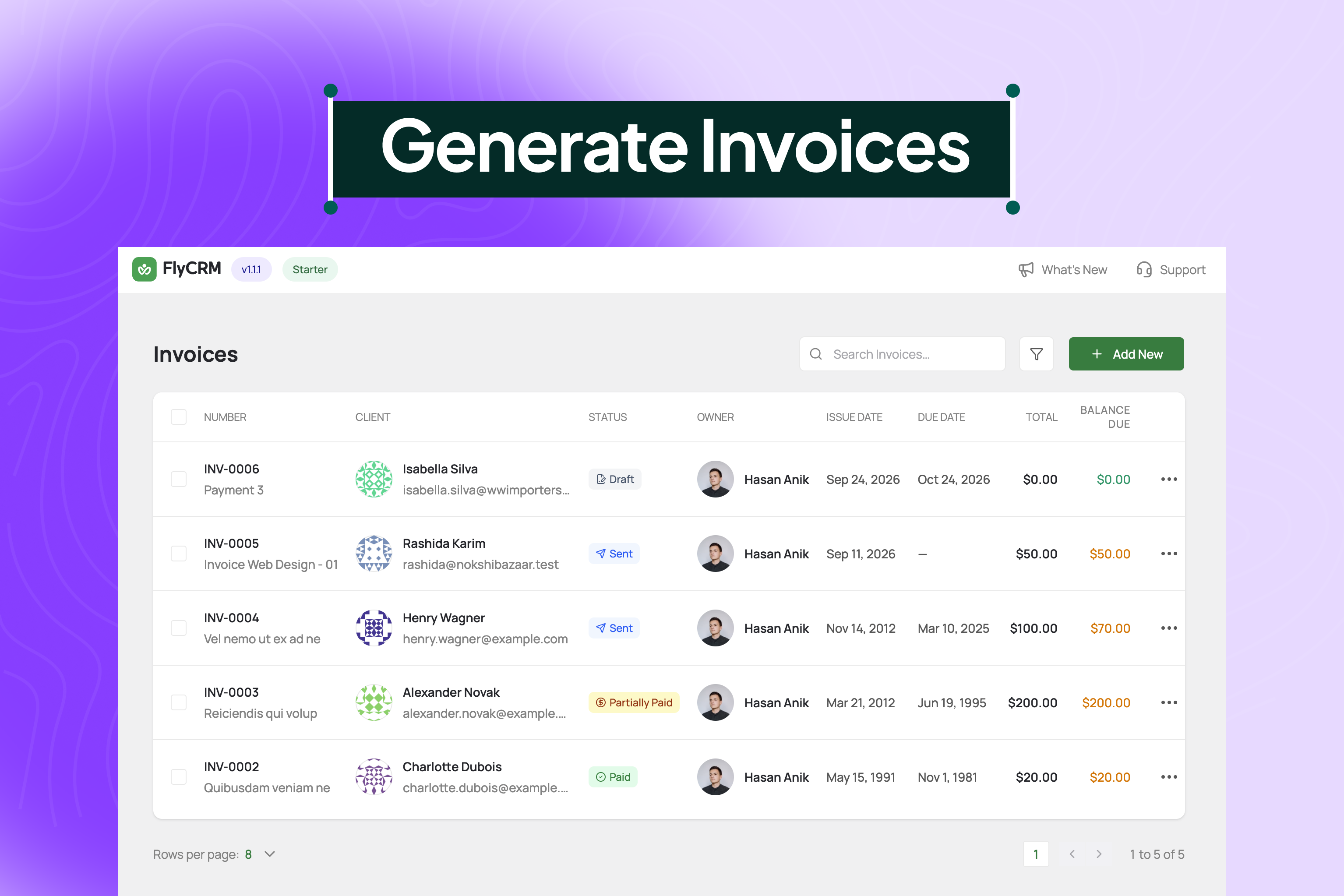
Invoices with draft, sent, partially paid and paid statuses, due dates and the balance due on each one (FlyCRM Pro)
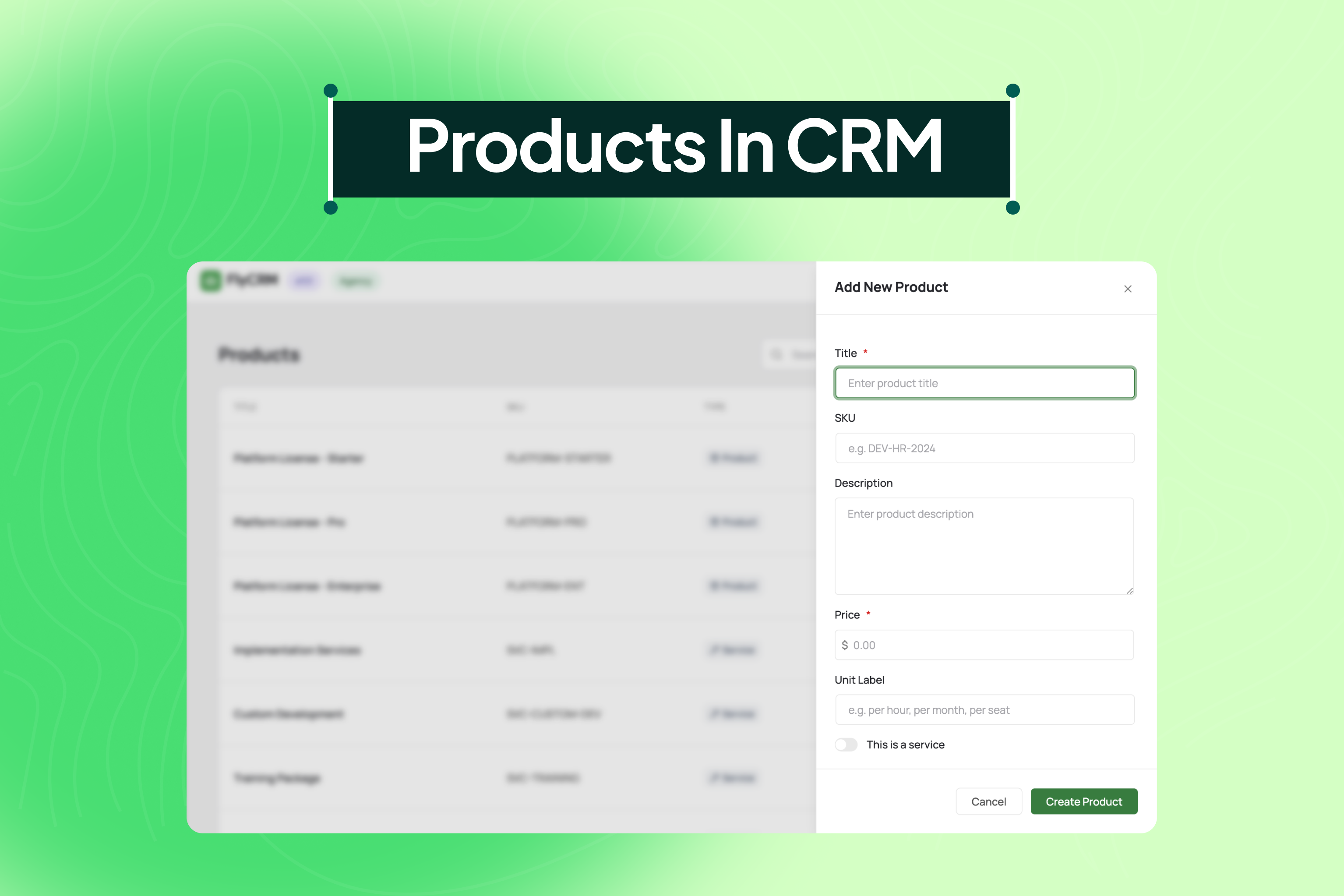
The product catalogue, where products and services are added with a SKU, price and unit label, ready to use in quotes and invoices (FlyCRM Pro)
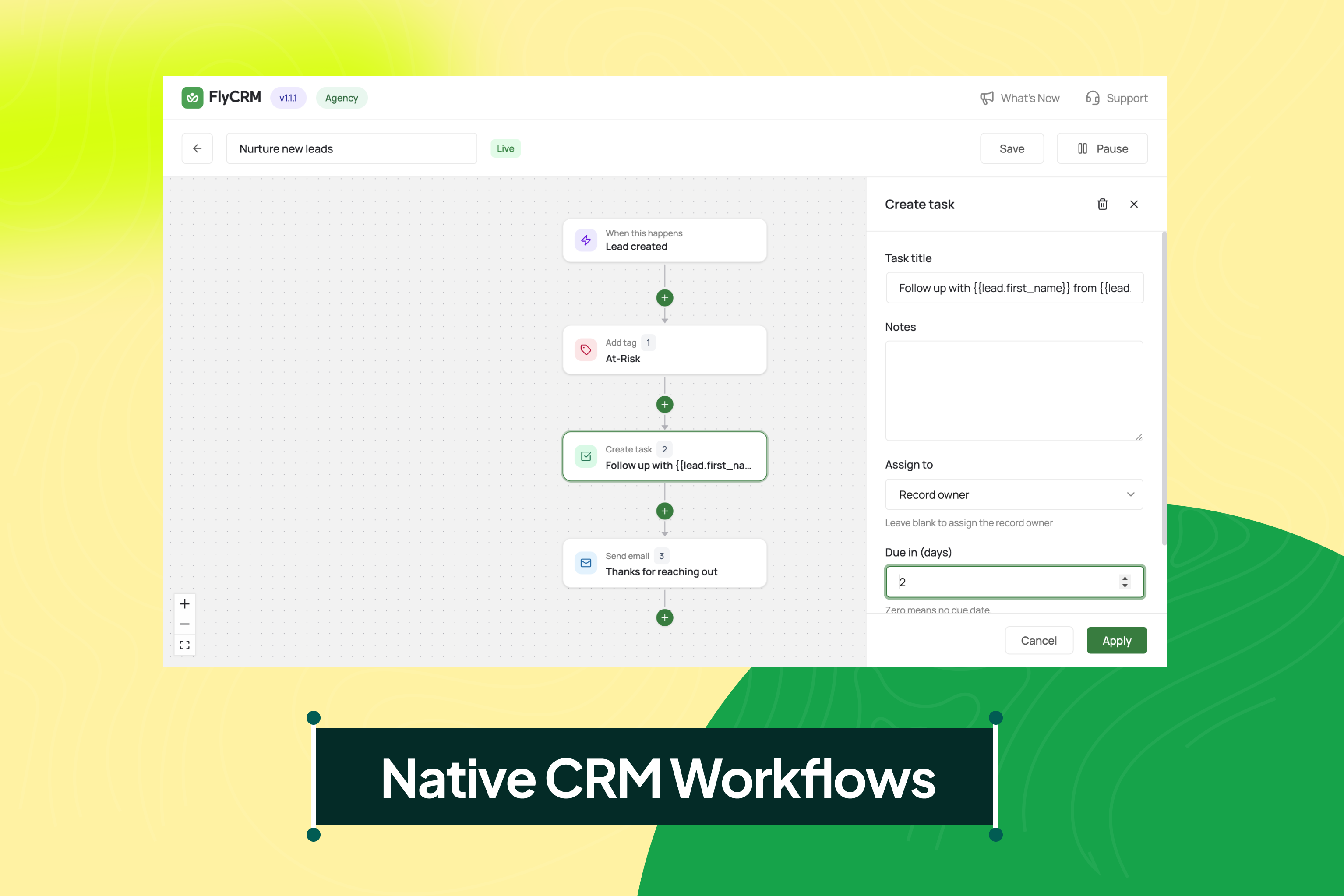
The visual workflow builder, where a new lead automatically gets a tag, a follow-up task and an email, with no extra automation plugin (FlyCRM Pro)
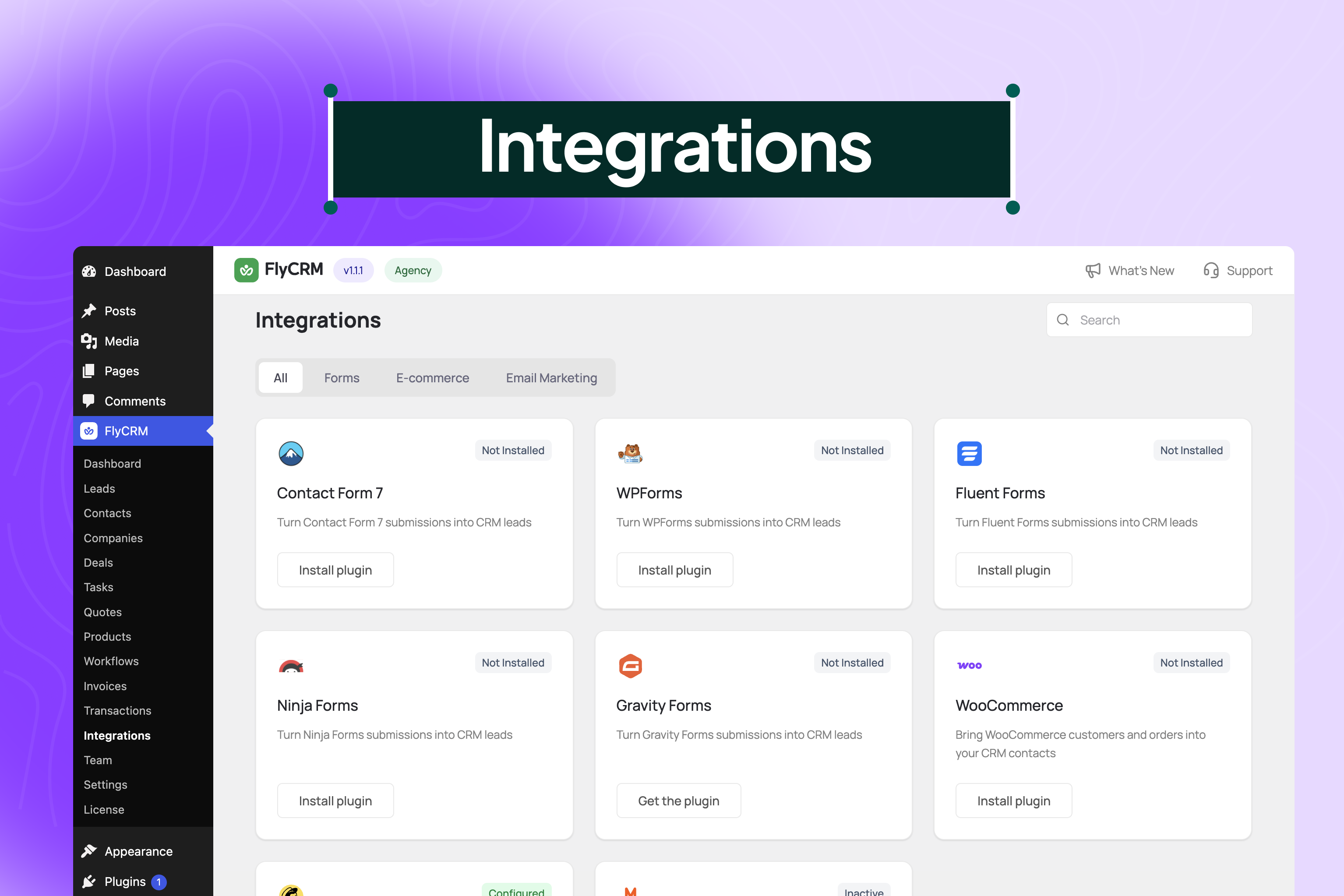
The integrations hub, with one-click installs to capture leads from Contact Form 7, WPForms and other form plugins, and to bring in WooCommerce customers
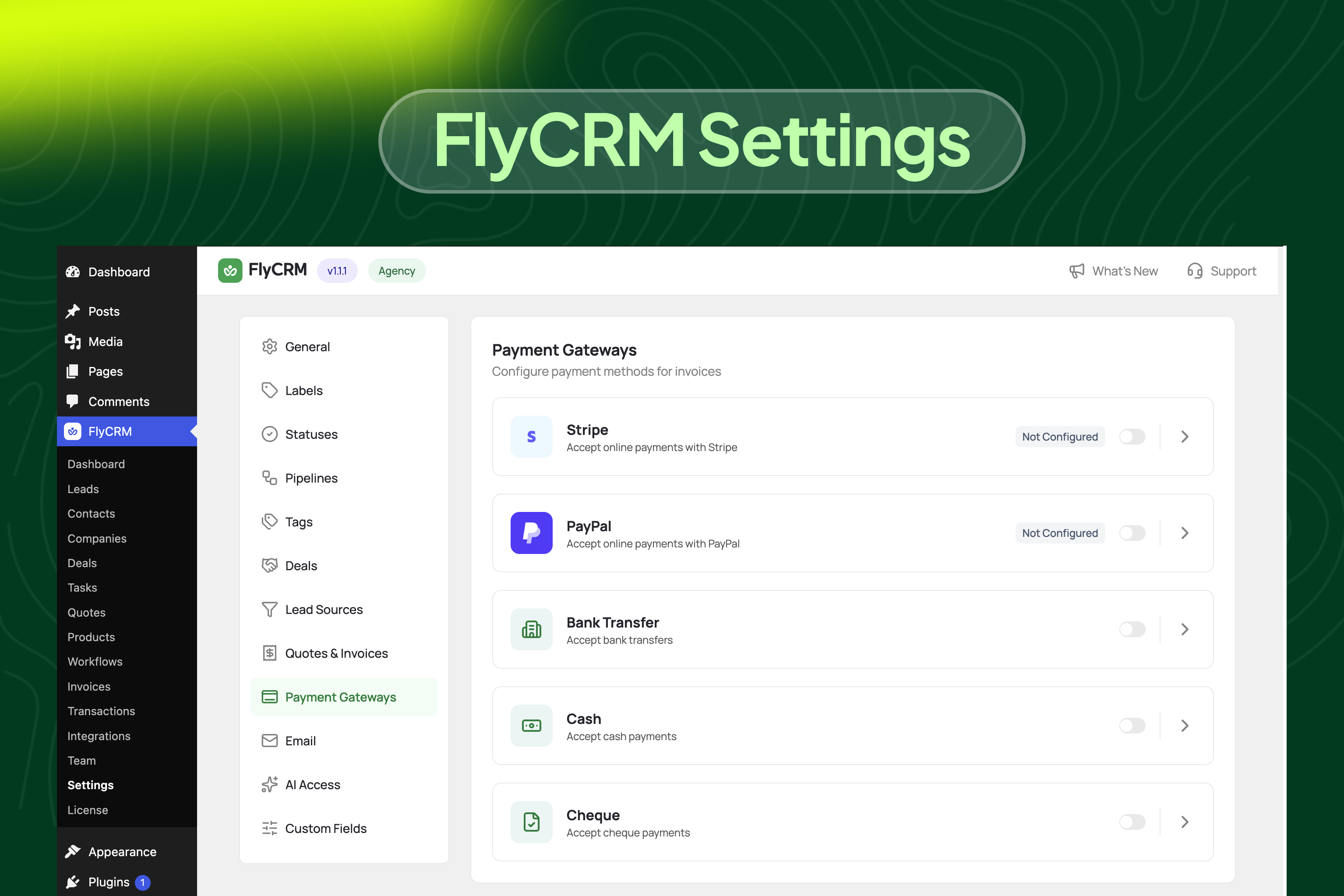
Payment gateway settings for invoices, with Stripe, PayPal, bank transfer, cash and cheque each switched on separately (FlyCRM Pro)
Installation
Minimum requirements
WordPress 6.5 or greater
PHP 8.0.2 or greater
From your WordPress dashboard
Go to Plugins, then Add New.
Search for FlyCRM.
Click Install Now, then Activate.
Open FlyCRM in the admin sidebar.
Manual installation
Download the plugin zip file from WordPress.org.
Go to Plugins, then Add New, then Upload Plugin, and choose the file.
Click Install Now, then Activate.
First run
FlyCRM sets itself up on activation. You get a sales pipeline ready to use, a set of contact, company and lead statuses, and a starter tag list. Nothing else has to be configured first. Open the FlyCRM menu and add your first contact, or go straight to Import if you already have a CSV.
To capture leads from your forms, open FlyCRM, then Integrations, switch on the form plugin you use, and add a feed for each form you want leads from.
FAQ-e
-
Is FlyCRM a free CRM, and what needs FlyCRM Pro?
-
The free plugin covers contacts, companies, leads with scoring and one-step conversion, as many sales pipelines as you need, the kanban deal pipeline board, deals with several stakeholders, quotes with a PDF and a public accept or decline page, the full activity timeline, CSV import and export, lead capture from five form plugins, WooCommerce order sync, the Dokan and weMail integrations, the dashboard, both CRM roles and email sending through your own mail server, all with no record limit. FlyCRM Pro adds invoices and online payments, workflow automation, custom fields, the product catalogue, sales reports, email templates, inbox sync, colleague invitations, lead CSV import, automatic lead scoring, the CRM Admin role and the HubSpot, Help Scout, AWeber, Mailchimp, MailPoet and Google Workspace integrations. The full free list is in the description above.
-
Is FlyCRM a CRM with lead management and lead scoring?
-
Yes. Lead management is where most of the work in FlyCRM starts. Leads come in from Contact Form 7, WPForms, Fluent Forms, Ninja Forms and Gravity Forms, or you add them by hand. Each lead carries a score you set, a status from New through to Converted, and lead tracking for the campaign, medium, source, content and term it arrived on, plus the page that referred it. When a lead is ready, one step turns it into a contact, a company and a deal.
-
Can I use FlyCRM for client management?
-
Yes. Client management in FlyCRM builds on its contact management. Each client is a contact, and a client that is a business can also have a company profile with the people who work there. Every client record holds a timeline of notes, calls, emails, meetings, tasks and files, along with their deals and quotes. Owner assignment shows who looks after each client, and last-contacted tracking shows when they last heard from you. That makes it a practical client management tool for freelancers and agencies as well as sales teams.
-
Is FlyCRM a B2B CRM?
-
It suits B2B selling. Contacts belong to company profiles that carry industry, employee count, revenue and website. One deal can hold several contacts, each with their own role, which is how a decision usually goes through a business. Quotes go out with line items, discounts and tax, and the buyer accepts or declines from a link without a WordPress account.
-
How is FlyCRM different from WP ERP’s CRM?
-
FlyCRM comes from the team behind WP ERP, but it is a separate plugin, built again from the ground up. It is not an upgrade from WP ERP CRM and it does not share WP ERP data, so each plugin keeps its own records. FlyCRM is for people who want a faster CRM screen and a sales pipeline they can read at a glance.
-
Can I send invoices with the free plugin?
-
No. The free plugin sends quotes, with a PDF attached and a public link your client can accept or decline from. Invoices, invoice payment tracking, turning a quote into an invoice and taking payment online are all in FlyCRM Pro.
-
Is FlyCRM a self-hosted CRM?
-
Yes. Every record sits in your own WordPress database on your own hosting. There is no outside service, no key to paste in and no account to open. If you deactivate the plugin your data stays where it is.
-
Is FlyCRM a WordPress CRM or a separate app?
-
FlyCRM is a WordPress CRM plugin. Its screens live inside your WordPress admin, its records live in your WordPress database, and it uses the WordPress users and roles you already have. There is no separate app to open and no second login to remember.
-
Is FlyCRM a good freelancer CRM?
-
It is built for that case. A freelancer CRM needs contacts, a way to tell which enquiries are worth chasing, a pipeline for work in progress and quotes a client can sign off. All four are in the free plugin, with no record limit and no subscription.
-
Is FlyCRM a good agency CRM or small business CRM?
-
Yes. A small team shares one sales pipeline without per-seat fees, and the CRM Agent role keeps each person to their own records unless you open them up. An agency keeps its client records in its own database, on hosting in whichever country it chooses.
-
Is there a limit on how many contacts, leads or deals I can keep?
-
No. FlyCRM does not count your records and does not charge for them. The only ceiling is whatever your own hosting can hold.
-
How does lead scoring work?
-
Every lead carries a number you set yourself, and you sort and filter your lead list by it. The free plugin does not score leads automatically, so the number reflects your own judgement rather than a rule engine you have to configure before it is any use. FlyCRM Pro adds automatic lead scoring: every contact and lead gets a score from 0 to 100, built from what the CRM already records, such as form submissions, calls, meetings, orders, replies, quote views and deal progress, and scores fade over time.
-
What is the difference between a lead and a contact?
-
A lead is somebody who has shown interest. A contact is somebody you are doing business with. Keeping them apart means an enquiry that goes nowhere never sits in your customer list. When a lead is ready, one step turns it into a contact, a company and a deal, and the lead history follows it across.
-
Can I run more than one sales pipeline?
-
Yes. Create as many as you need, each with its own stages. Stages can be reordered by dragging, and each one carries a win probability.
-
What is the CRM kanban board?
-
It is how FlyCRM shows your sales pipeline. Each stage is a column, each deal is a card with its value, probability and close date, and you drag a card to the next stage as the deal moves. Every column shows how many deals it holds and their total value.
-
How does deal management work in FlyCRM?
-
Every deal carries its value, expected close date, win probability and the contacts involved, each with their own role. It moves across the stages of your sales pipeline until it is won or lost, every stage change is recorded, and quotes, notes, calls and meetings stay attached to the deal.
-
Can I import my existing contacts?
-
Yes. The free plugin imports contacts and companies from a CSV file, with field mapping and duplicate detection on email address. Lead import is in FlyCRM Pro.
-
Can I export my contacts?
-
Yes. An Export button next to Import downloads a CSV of exactly what the lead, contact or company list shows, with its search, filters and order. The file opens cleanly in Excel and maps itself when you import it again.
-
Can clients see a quote without a WordPress account?
-
Yes. Every quote gets its own public link, a long random web address that nobody can guess, and the accept and decline actions on it are protected. Your client opens the link in a browser, reads the quote, downloads the PDF and accepts or declines it. You see when it was opened and what they decided.
-
What happens after a client accepts a quote?
-
The quote status changes to accepted and the acceptance is recorded against the deal, so the pipeline reflects it without anybody editing a record by hand. Turning that accepted quote into an invoice is in FlyCRM Pro.
-
Can I capture leads from my contact forms?
-
Yes. FlyCRM works with Contact Form 7, WPForms, Fluent Forms, Ninja Forms and Gravity Forms. Switch on your form plugin under FlyCRM, then Integrations, add a feed for the form, map its fields to CRM fields and pick a lead source. Every submission after that becomes a lead.
-
Can I use FlyCRM as a WooCommerce CRM?
-
Yes. Orders create contacts on their own, and you choose which order statuses trigger it and which status and tag a new customer gets. The contact then shows total order value, order count, average order value and last order, with each order on the activity timeline.
-
Will my existing WooCommerce customers come in?
-
Yes. There is a one-time import for customers who ordered before you installed FlyCRM, so you are not starting with only the people who buy from tomorrow.
-
Does FlyCRM work with Dokan and weMail?
-
Yes. With Dokan, an approved vendor becomes a contact and their store becomes a linked company. Live, First Sale and Closed tags follow each vendor over time, and vendors you already have are imported in the background. With weMail, contacts are pushed to a weMail list as they change, and existing contacts can be synced in bulk.
-
Does FlyCRM work with HubSpot, Mailchimp or Google Workspace?
-
Yes, with FlyCRM Pro. HubSpot syncs contacts one way or both ways, Mailchimp, MailPoet and AWeber keep your email lists in step, Help Scout customers and their conversations show on the contact, and Google Workspace adds Google Meet links and calendar invites to your meetings.
-
Can more than one person be attached to a deal?
-
Yes. A deal takes several contacts, each with their own role, which is what you need when a decision goes through more than one person. Every one of them keeps their own timeline as well.
-
How do roles and permissions work?
-
There are two roles. CRM Manager reaches everything. CRM Agent reaches their own records only, which suits a salesperson. Administrators get full access on activation. Underneath, access is set for each record type and each action, so somebody can be allowed to add and edit a deal without being allowed to delete one. An agent can be given everyone else’s records as well, one record type at a time, when a team needs to share. FlyCRM Pro adds a CRM Admin role, which runs the whole CRM, settings and team included, without WordPress admin rights.
-
Can I get a deleted record back?
-
Yes. A deleted record goes to trash and can be restored. There is a separate permanent delete for the times you mean it, and it is a different permission, so an agent who can delete does not automatically have it.
-
Will FlyCRM slow down my site?
-
No. FlyCRM keeps its own records rather than filling up your posts and pages, and its screens load only inside the FlyCRM area of the admin. The only thing it puts on the public side of your site is the quote page, and that loads for nobody except the client opening a quote on its own link.
-
Where is my data stored, and what happens if I deactivate FlyCRM?
-
In your own WordPress database, on your own hosting. Deactivating FlyCRM leaves every record where it is in its own database tables, and the two CRM roles stay in place as well, so reactivating does not mean setting your permissions up again.
-
Can FlyCRM send email, and can I use my own mail server?
-
Yes to both. You can send a quote from the CRM with the PDF attached, and FlyCRM has its own mail server settings with a test button so you can check them before you rely on them. Every message it sends is logged against the record it belongs to.
-
Is FlyCRM available in other languages?
-
FlyCRM is ready to be translated and every word on screen can be translated with the standard WordPress tools. No finished translations ship with the plugin yet. Quote PDFs can already carry Bengali, Chinese, Japanese, Korean and other scripts: FlyCRM downloads a matching font in one click.
Reviews
There are no reviews for this plugin.
Contributors & Developers
“FlyCRM – CRM with Sales Pipeline and Deal Management for WooCommerce” is open source software. The following people have contributed to this plugin.
Contributors


Translate “FlyCRM – CRM with Sales Pipeline and Deal Management for WooCommerce” into your language.
Interested in development?
Browse the code, check out the SVN repository, or subscribe to the development log by RSS.
Changelog
1.2.0, 19 October 2026
Highlights
-
Dokan integration: every approved Dokan vendor becomes a contact, and their store becomes a linked company. Live, First Sale and Closed tags follow each vendor, orders can be logged on the vendor’s timeline, and existing vendors are imported in the background
-
weMail integration, free: contacts go to your weMail list as they change, and existing contacts sync in bulk
-
Export to CSV: an Export button beside Import on leads, contacts and companies downloads exactly what the list shows, with your search, filters and sort. Status, tags, owner and custom fields come with it, the file opens cleanly in Excel, cells that look like formulas cannot run, and the file maps itself when you import it back
-
Quotes and invoices in more languages: when a document has Chinese, Japanese, Korean, Bengali or other text the built-in PDF font cannot show, FlyCRM warns you and downloads a matching font in one click
-
Ready for lead scoring: contacts carry the lead score FlyCRM Pro calculates, and a customer opening a quote or invoice counts toward it
Improvements
-
Contact and company lists show when each record was created and last active, and every activity log starts with a Created entry, including imported and synced records
-
A converted lead links to the deal it became
-
Web addresses in the activity timeline are clickable
-
Meeting times show your site’s time zone
-
Log an email with a saved template, not only send one (templates come with FlyCRM Pro)
-
Meetings have a slot for a Google Meet link, filled by FlyCRM Pro’s Google Workspace integration
-
New date format “Mar 2, 2026”, now the default. A format you already chose is kept
-
Clearer WooCommerce integration settings
-
The Import button stays in the page header when a list is empty
-
Workflows and the HubSpot integration show in FlyCRM as Pro features
-
Runs on PHP 8.0.2 and later (was 8.1)
Fixes
-
Quotes and invoices from CRM Agents and Managers now use your default tax, notes and terms
-
Anyone who can see a lead, contact or deal can see its quotes and invoices
-
Previewing a quote or invoice as staff no longer counts as the customer viewing it
-
Replies sent from FlyCRM stay in the customer’s email thread
-
The Send dialog shows the email as written, not as HTML code, and shows your saved template for every team member
-
Sending a quote or invoice with a transparent logo no longer fails on some hosts
-
The Quotes tab and the quote form work when the issue date is empty
-
Activity times are right in every time zone, also after you change the site’s time zone
-
Every date in the CRM follows your Date Format setting
-
You can edit and delete the activities you logged
-
A deal created in a Won or Lost stage is closed right away
-
A lead is marked Converted only when you convert it
-
Administrators can permanently delete any record in the trash
-
Long contact imports finish instead of stopping part way
-
Web addresses save exactly as you type them
-
Integration settings show every field, mark tags that were deleted, and drop a None choice where a value is always needed
-
Updating FlyCRM to 1.2.0 while FlyCRM Pro 1.1.1 is installed no longer breaks the dashboard, invoices, quote conversion or the customer portal
-
The admin menu, header, Settings, Integrations, list pages and dashboard fit a phone screen
-
Smaller fixes: the Need Attention link opens the filtered deal board, settings keep keyboard focus and save lists correctly, AI assistant (MCP) tool switches keep every change, lists refresh when an add-on’s filter changes, the Go Pro page no longer marks shipped integrations “Coming soon”, and the admin design is consistent across screens
For developers
-
flycrm.activity.createdfires in the admin after an activity is saved -
Saving tags from the Edit Tags dialog fires
flycrm_{entity}_tag_attachedandflycrm_{entity}_tag_detachedfor each tag added or removed
1.1.1, 17 September 2026
-
Design refresh: every screen of the WordPress CRM now follows one design system, with matching buttons, badges, tables, filters, pagination, side panels, dialogs and menus, the Manrope typeface served from your own site, thin scrollbars and a page transition
-
Delete asks first: every delete in the CRM, including bulk deletes, files and integration feeds, opens the same confirmation dialog instead of the browser prompt
-
Empty states explain themselves: an empty list, a filtered table with no match, an empty trash and every settings table say why nothing is there and what to do next
-
Save only when something changed: every edit form enables Save or Update once a value differs from what it opened with
-
Contact, company, lead and deal pages: the record name edits in place, the tabs show counts for Activities, Deals, Quotes, Invoices and Files, contacts get Quotes and Invoices tabs, and linked records sit in each activity’s meta line
-
Sales pipeline: the deal pipeline board and the task board show a scrollbar when stages run past the edge, use the full width on a wide screen, keep every column at the same width, and confirm a stage change with a plain Cancel and Mark as button
-
CRM dashboard: five KPI cards on by default (Leads, Contacts, Companies, Activities, Open Quotes) with the rest behind the Customize menu, a period selector on Pipeline Health, and recent notes show their first words
-
Quotes and invoices: the document title shows beside its number in lists, on the page, on the public link and in the PDF; every status carries an icon; a declined quote shows the client’s reason and a History card, and the owner’s email includes the reason; a blank line item is skipped and a priced row without a title is refused
-
Public quote and invoice links: the page follows the FlyCRM design, matches the admin page width, and a draft, deleted or unknown link shows a clear message instead of a bare line of text
-
CSV import for leads, contacts and companies: opens on a drop zone with a Download Sample CSV whose columns map themselves, asks whether to skip or update rows that match an existing record, gives imported records a default status and source, and refuses a duplicate company name
-
Integrations: install and activate Contact Form 7, WPForms, Fluent Forms, Ninja Forms or WooCommerce from the integration card with a progress bar (Gravity Forms links to its vendor); settings are grouped into sections, short fields share a row, and fields that depend on a switch stay hidden until it is on
-
Settings: navigation icons and tab groups per design, card headings with a description, and the Unsaved changes bar stays at the foot of the window while you scroll
-
Notifications use one toast design; the setup wizard sits in the middle of the screen and its walkthrough plays the published FlyCRM video; a stale link inside the app lands on the dashboard
-
Go Pro page shows the current FlyCRM Pro pricing with lifetime and yearly plans
-
WordPress.org Live Preview installs the plugin before seeding demo data, and the release zip leaves out vendor manifests, docs and build scripts
1.1.0, 15 September 2026
-
The plugin header now shows your licensed plan beside the version number
-
What’s New opens the FlyCRM changelog
-
Licence links now open the License page for Pro inside the app
1.0.0, 10 July 2026
-
Initial release
-
Contacts and companies with full profiles, addresses, tags and custom statuses
-
Leads with scoring, source tracking and one-step conversion to contact, company and deal
-
Sales pipelines with custom stages, a win probability on each stage, and a drag-and-drop kanban board
-
Deals with value, expected close date, win probability, several stakeholder contacts and recorded stage changes
-
Quotes with line items, discounts, tax, a PDF and public accept or decline pages
-
Activity timeline for notes, tasks, calls, emails, meetings and files, shared across record types
-
Lead capture for Contact Form 7, WPForms, Fluent Forms, Ninja Forms and Gravity Forms, with field mapping for each form
-
WooCommerce order sync, with order history on the contact and a one-time import of earlier customers
-
CSV import for contacts and companies
-
Dashboard with period comparison, pipeline value by stage, activity feed and upcoming work
-
CRM Manager and CRM Agent roles, with access set per record type and per action
-
Email sending through your own mail server, with PDF attachments